
Free and private AI-assisted coding on Sherlock
1773455342036
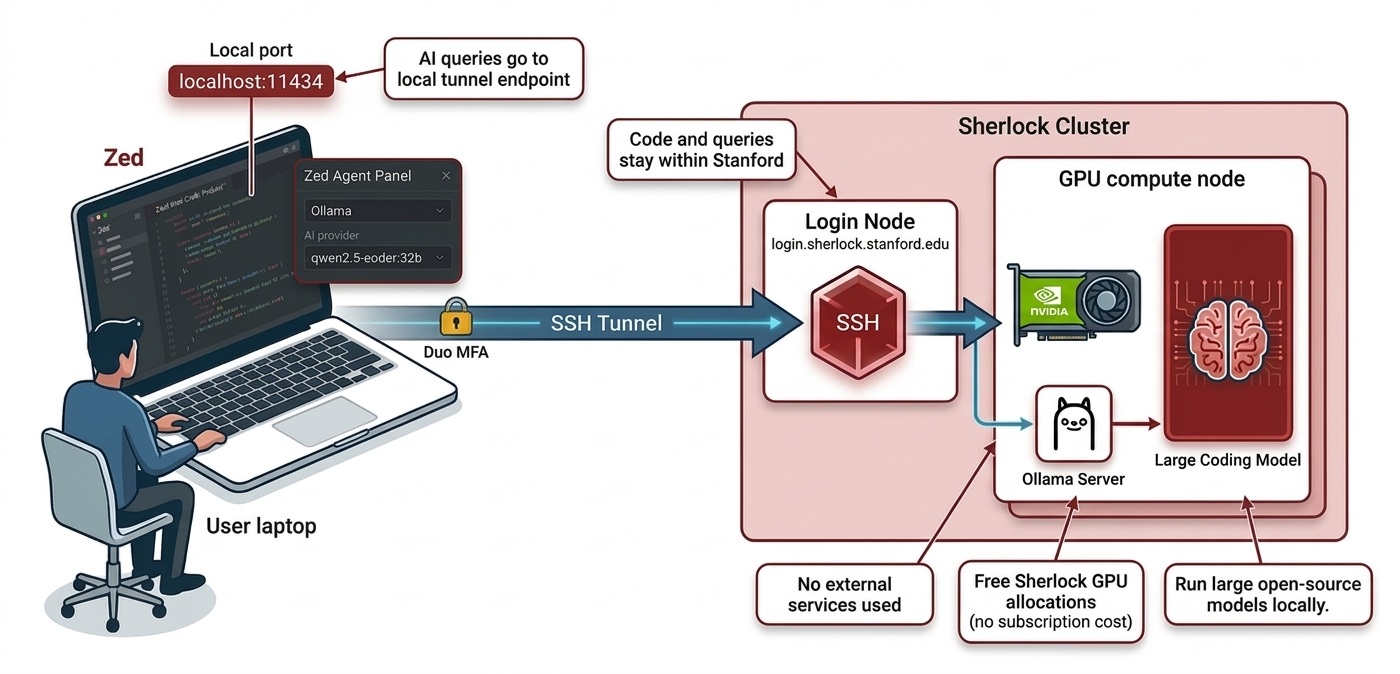
We're excited to announce a brand new section in the Sherlock documentation, covering how to bring AI coding tools into your HPC workflows, for free, and without sending your code and data anywhere outside Stanford.
Zed + Ollama: the full AI coding experience, for free, on campus
The centerpiece is a guide for running Zed paired with Ollama on a Sherlock GPU node. Zed is a fast, open-source code editor that connects to Sherlock over SSH and works directly on your files. No local copy, no synchronization headaches. It feels like a local editor, but everything runs on Sherlock. Pair it with an Ollama server on a GPU compute node, and you unlock a full AI assistant: a chat panel to ask questions about your code, inline assistance to refactor or explain selected snippets, and edit predictions that suggest completions as you type.
The best part? Your code, prompts, and completions never leave Stanford's infrastructure, which matters a lot when working with sensitive or unpublished research data. And because you're running on Sherlock GPU allocations, there's no subscription, no per-token cost, and no rate limits. If you've ever caught yourself rationing prompts mid-session because you were watching a usage meter tick down, that particular anxiety doesn't exist here.
You also get access to some genuinely capable open-weight coding models:
Qwen2.5-Coder currently one of the strongest open-source coding models, with excellent performance on code generation, completion, and debugging across most languages
DeepSeek-Coder-V2 a strong alternative with broad language support and solid reasoning over large codebases
CodeLlama a reliable and well-tested coding model for code generation and infilling tasks
Llama3 a general-purpose model that handles mixed code/text tasks well, useful when you need explanations as much as code
Many of these are already cached on Sherlock, so they pull quickly without downloading from the internet.
The setup guide walks you through starting an Ollama server as a batch job, opening an SSH tunnel to reach it from your laptop, and configuring your local Zed instance to use it as its AI backend.
AI coding agents on Sherlock
We've also put together a coding agents page covering the CLI-based AI tools now available as modules on Sherlock:
Claude Code (Anthropic)
Gemini CLI (Google)
Codex (OpenAI)
Mistral Vibe (Mistral AI)
Crush (Charm)
These tools can read and edit files, run commands, and carry out multi-step development tasks directly from your terminal, which makes them a natural fit for remote HPC work over SSH.
And for those who prefer to keep things local and private, each agent that supports it is documented with configuration examples pointing to a Sherlock-hosted Ollama instance, so you get the same privacy guarantees as the Zed setup.
We hope these new tools and docs make your time on Sherlock more productive. As always, don't hesitate to reach out if you have questions or suggestions. And happy coding!
Did you like this update?